

- Roofing
- Fencing
- Landscaping
- Remodeling
- Foundation
- HVAC
- Plumbing
Garland web design for contractors whose work is better than their website.
We do Garland web design around how homeowners actually pick a contractor: they search, look at the photos, and call the company whose site shows a job like theirs. We build yours to show the jobs you've already finished, so more of them find you and more of them ask for an estimate. One fixed price, in writing.
30 minutes on Google Meet. Then a fixed-scope quote in writing within a week.
What a website earns you
Found, then picked: the two ways a website pays a contractor.
The work your website brings in comes down to two numbers: how many Garland homeowners find it, and how many of them then ask you for an estimate. Lift either one and you book more jobs. Lift both and they multiply.
A phone number, a list of services and a few stock photos do neither. Google has little to show for them, and a homeowner sees nothing that looks like their job. Ours are built for both from the day they launch.
-
More homeowners find you
Every page is built to Google's best practices, so Google can read what you do and where you do it.
-
More of them ask for an estimate
Every page is built on conversion psychology: what a homeowner needs to see, and in what order, before they call you and not the next company.
About 2 in every 100 visitors got in touch
About 8 in every 100 visitors got in touch
- Same 1,000 visitors
- 18, then 80 got in touch
- Conversion rate
- 1.8%, then 8.0%
A contractor site we built
Every finished job, a page with its own address.
Before a homeowner asks for an estimate, they want to see you've done a job like theirs, close by. Google wants a page about that work in that town. Give every finished job its own page and both of them find what they're after.
1A finished job
Denver, CO
Settling 1950s Home Foundation Stabilization
2Its own address
stratalockusa.com/case-studies/settling-home-denver-co/3Its town page
Soil stabilization, Denver
Real Denver job
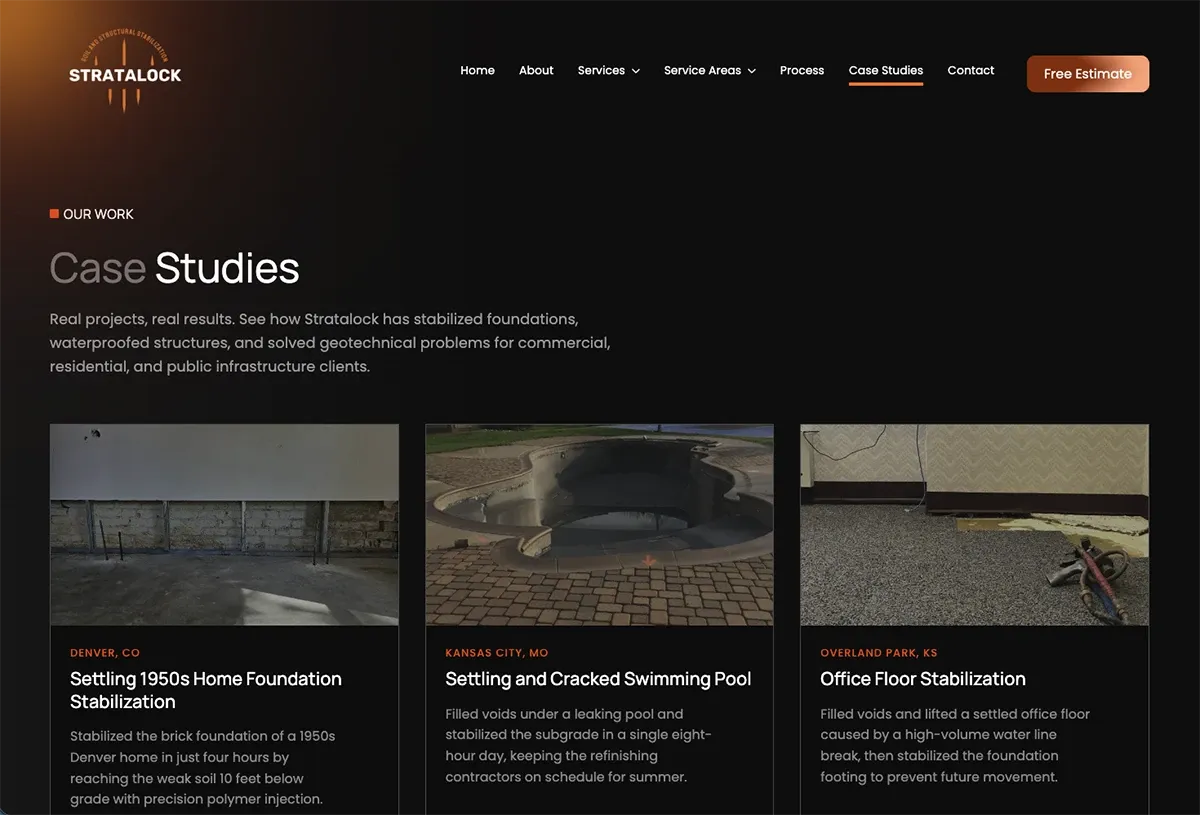
Stratalock, a foundation-repair company we built for
Stratalock works Phoenix, Denver, Kansas City and Chicago. Not Texas. We show it because its homeowners pick a contractor the way yours do: they look for a job like theirs, near them.
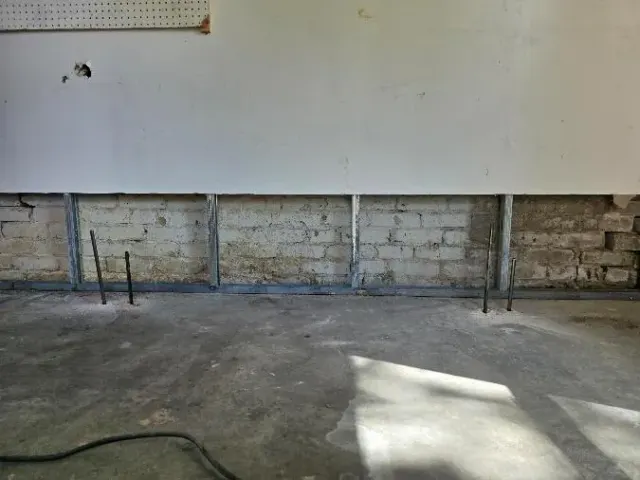
Its site has eight finished jobs, each on a page named for the work and the town: a settling home in Denver, a sinking patio in Chicago, a cabinet manufacturer in Phoenix. The Case Studies page sorts them by town and kind of job, and the Denver and Chicago city pages each show their local job. We take its 27 pages apart one at a time on our page about contractor website design.
- 8finished jobs, each with its own address
- 27pages on the site
- 98Google's speed score on a phone, job photos and all
Your jobs, set up the same way
yourcompany.com/jobs/the-job-the-town/
Every job your crews finish can get a page named for the work and the town it was in, and show up on the page for that town. A homeowner in Garland, Rowlett or Sachse sees you've done their kind of job near them. Google gets a page about that work in that place.
Adding the next one is an afternoon's work. Your part is a few photos and a few lines about the job.
Talk through your jobs on a 30-minute callThe first question, answered on the page
“Do you come out to me?” answered before they pick up the phone.
It's the first thing a homeowner wants to know, and most contractor sites make them call to find out. Answer it on the page and the calls you get come from people you can actually take on, with the estimate request sitting right under the yes.
Service area
Do we come out to you?
Yes.
We come out to Garland.
Not yet.
We don't come out to 76102 yet.
Five digits, please.
A ZIP code looks like 75041.
Your side The estimate request sits right under the yes. Every waitlist ZIP shows you where homeowners want you next. A wrong ZIP gets a plain nudge, not a dead end.
Try one, or type your own
A labelled demo: the answers come from a short sample list written into this page, and nothing you type leaves your browser. Pristine Bins runs the real one.
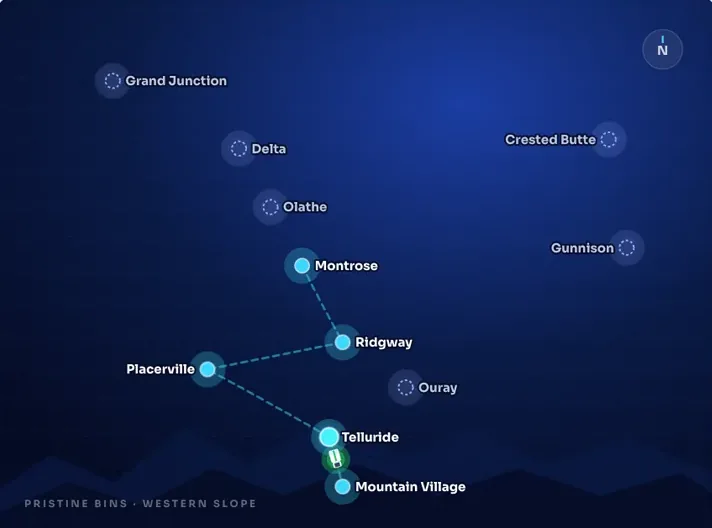
Pristine Bins: one list behind every answer
Pristine Bins cleans trash bins on Colorado's Western Slope. Not a contractor, and nowhere near Texas, but its customers open with the same question yours do, because whether it serves you and what it costs both depend on your ZIP.
So one service-area list runs every ZIP check, plan, price and map marker on the site. A Telluride ZIP sees the premium Pristine Subscription alongside the standard plan. A Montrose ZIP sees the three standard tiers. A Denver ZIP gets a straight “not yet” and an invitation to the waitlist, which shows Pristine where to grow next.
- 11service areas on that one list
- 7pages, every price drawn from it
- 1line to add a town or change a price
What it does on your site
A homeowner in Garland, Rowlett or Sachse finds out in seconds that you come out to them, and the estimate request is right there while they still want the job done. Someone outside your area gets a polite “not yet” instead of a call that goes nowhere, and you see where people are asking for you.
We build a check like this when where you work decides who you can take on. Plenty of sites don't need one, and we'll tell you on the call whether yours does.
Talk through your service area on a 30-minute callWeb design Garland · getting found
Built for the searches Garland homeowners type.
A homeowner with a leaking roof doesn't type your company's name into Google. They type the job and the town, the way they'd say it out loud. This is the half of Garland web design a homeowner never notices: a page on your site for each of those searches, written the way they'd ask. For a look at who shares page one for searches like these, national franchises beside local companies, see our page on web design in Round Rock.
One thing we won't promise is a spot on Google. Google decides where you show up, and nobody can guarantee it. What we can do is give it a clear page for every service you sell and every town you work, and show you the numbers from the day you launch.
-
A page for each service you sell
Search: roof replacement garland
Answered by the page yourcompany.com/roof-replacement/ Roof replacement in Garland
-
A page for each town you work
Search: roofing company rowlett
Answered by the page yourcompany.com/areas/rowlett/ Roofing in Rowlett
-
Their words in your headings
Search: roof leaking after storm
Answered by the page yourcompany.com/roof-leak-repair/ Roof leaking after a storm? Not “Residential Roofing Solutions”
A town page for each place you actually work. Around Garland, that might be:
- Garland
- Rowlett
- Sachse
- Wylie
- Richardson
- Mesquite
Built in from the day you launch
- Quick on a phone Every page opens fast on the phone in a homeowner's hand, which Google looks at too.
- Labels written for Google Behind each page, plain labels tell Google what you do, which towns you do it in and how to reach you.
- Tied to your Google listing Your site and your Google Business Profile, the listing that shows on Maps, point to each other, so Google sees one company.
- Google's reports, switched on Search Console and Google Analytics go on at launch, so you can see which searches show your site and who comes through.
Moving from an old site? What finds you now comes along
On launch day, every address on your current site gets pointed to its new page. An old Google result or a link someone saved lands on the right page instead of an error, so what already finds you carries over to the new site.
Example · yourcompany.com on launch day
- /roofing-services.html now goes to /roof-replacement/
- /index.php?page_id=12 now goes to /areas/rowlett/
- /contact-us.html now goes to /contact/
Built in Astro · speed and upkeep
Fast on a phone in a driveway, and nothing to patch.
The homeowner looking you up is usually on their phone, out in the driveway, sometimes on one bar of signal. If your page hangs, they tap back and call the next company. We build every site in Astro, which sends each page out as light, plain HTML carrying only the code that page needs. It opens fast on that phone, and Google reads it easily.
Nothing riding along, nothing to babysit
If your site runs on WordPress or a page-builder template, every screen hauls a theme, plugins and the builder's own code, whether that page uses them or not. All of it slows the phone view, and all of it needs updating to keep working. Yours carries none of it.
After launch, we host it and keep it current, or hand it over to you clean. Either way, it's yours.
| Template site | Yours | |
|---|---|---|
| Plugins to update | Yes | None |
| A theme to keep current | Yes | None |
| Page-builder code on every screen | Yes | None |
| What reaches the phone | All of the above | Light HTML, only what the page needs |
Who you'd be working with
The two people on your call are the two who build it.
Bullfinch is two people, Kyle and Katie Rutten. We're a remote studio, not a Garland one, so the work comes to you: calls on Google Meet in your Central-time working hours, and every change on a preview link you can open on your phone from a job site.
-

Kyle Rutten
Designs and builds every page
He started making websites when he was 14, and he's the one making yours, start to finish.
-

Katie Rutten
Runs the project and the account
The schedule and the invoices come from her, so you always know where your site stands.
No account managers, nothing handed off. What you tell us on the first call goes straight to the people doing the work, and they're the same two people on every call after it.
Book 30 minutes with Kyle and KatieWebsite design Garland · price and timing
The price, the weeks, and how little of your time it takes.
You'd ask on the call anyway, so here it is up front: what our Garland web design costs, how long a build runs, and what it needs from you while you're out on jobs.
-
The price
$5,000 to $40,000
What most of our sites come to. Yours gets one fixed number.
What moves it up or down
- How many of your services and towns get a page of their own
- Whether your finished jobs each get their own page
- Whether it connects to what you use for scheduling, estimates or payments
- Whether we write every word on it
- Whether ongoing SEO or Google Ads come with it
A fixed-scope quote, in writing, within a week of the call. It sets out what goes into the build and what it costs. No hourly meter running while you think it over, and no surprise invoices later.
-
The weeks
About 60 days
For a typical site, from the start of the build to launch. Under ten pages: 4 to 6 weeks. Bigger builds take 60 to 90 days.
Weeks, from the start of the build to launch
We'll tell you on the call which of these yours looks like.
-
Your time
Three things
That's what a build needs from you. Everything in between is on us.
- The 30-minute call On Google Meet, in your Central-time working hours. Your written quote follows within a week.
- One conversation about your jobs and your customers The work you want more of, the towns you cover, what homeowners ask before they hire you. The words on your site start there.
- Preview links, checked on your phone Each change lands on a link you open from the truck or between jobs. Tap through it and tell us what's off.
-
After launch
You pick: we keep hosting and updating it for you, or we hand the whole site over clean and you run it from there. It belongs to you either way.
Your fixed price, in writing, within a week of it.
Before you book · short answers
Fair questions from people who run crews.
Most of my work comes from referrals. Do I even need this?
Yes, because referrals look you up too. A homeowner handed your name still searches for you before they call, and your site is where they decide whether to. Show them jobs like theirs and that name turns into an estimate request.
Will I lose what Google already shows for me?
No. At launch, every address on your old site is pointed to its new page, so whatever already finds you on Google keeps finding you. Your Google Business Profile stays as it is, reviews and all; the new site gets linked to it, not swapped in for it.
Will it look like every other contractor site?
No. Every site we build starts from the business it's for, never from a template. Stratalock, a foundation repair company, and Pristine Bins, a family-run bin-cleaning service on Colorado's Western Slope, are both further up this page, and they look nothing alike. Yours starts from your trade, your jobs and the towns you work.
You're not in Garland, or even Texas. Does that matter?
No. We're a remote studio, so Garland web design with us runs around your day: calls on Google Meet in your Central-time working hours, and every change on a preview link you open on your phone, wherever the crew is.
Do I own the site?
Yes, it's yours. At launch you choose: we keep hosting and updating it, or we hand the whole site over clean, for you to run yourself or give to whoever you like.
Something we didn't cover?
Ask Kyle or Katie on the call. Thirty minutes on Google Meet, and you'll get a straight answer.
Book a 30-minute callGarland web design · the next step
Thirty minutes about the jobs you want more of.
Every week your site shows none of your work, homeowners searching around Garland ask someone else for the estimate: the company whose site does. Those are jobs you could be bidding on. This call is where that changes.
- Bring
- Your current site, and a couple of jobs you're proud of.
- On the call
- Kyle, who'd build your site, and Katie, who'd run the project. 30 minutes on Google Meet, in your Central-time working hours.
- After
- A fixed-scope quote, in writing, within a week. One price for the whole build.
Rather talk now? 720-299-8584
Pick a day, then a time
Loading availability
Days with open slots
No openings
We're booked solid for the next 30 days. Drop us a line and we'll find a time outside the window.
Calendar invite is on its way to your inbox. Hit reply if anything changes.